Sometime last year I noticed something I’d been doing multiple times a day without thinking about it. I’d be deep in a conversation with an AI chat, it would link me somewhere, and after reading the page I’d instinctively click the back button to get back to the chat, except the button was greyed out and there was nothing to click. Then comes the little realization that back isn’t available because this is a new tab, so I’d go find the X button instead. If the chat was the adjacent tab (which happens when the link is the newest thing I opened), closing the tab drops me right back into the conversation. Other times, when I had forty tabs open and the chat wasn’t next door because I had opened a pile of links or shuffled my tabs around, I’d have to go hunt for it, or just give up and open a fresh chat.
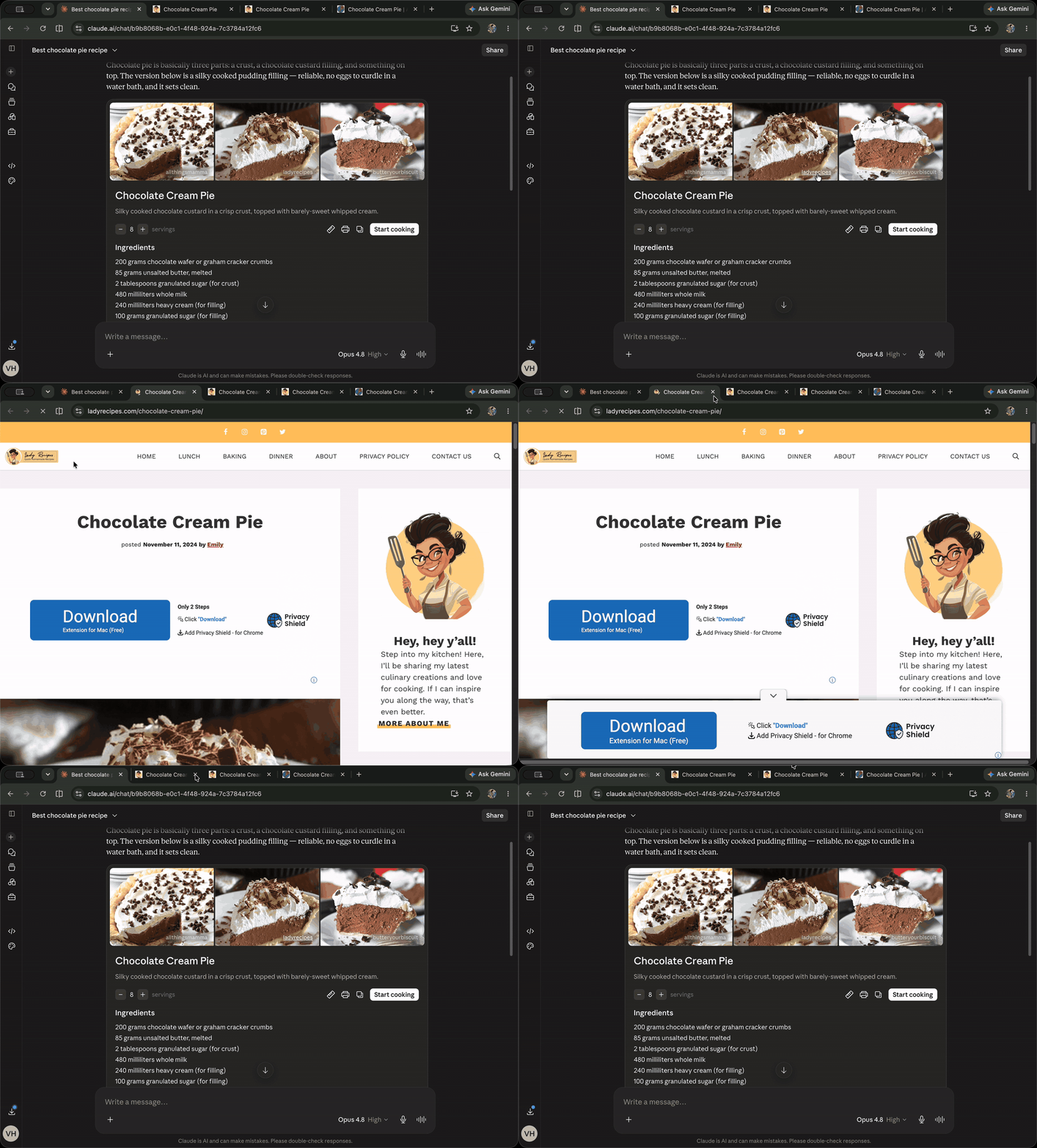 This is the status quo: a page opened from a Claude chat and a dead back button, so I instead had to shift over and find the X button to get back to the conversation.
For a long time I assumed this was simply how browsers work, and it turns out that this is only how browsers work so far.
A decades-old behavior meets a new world
The back button has been disabled in new tabs for as long as tabs have existed. When you open a link in a new tab, that tab starts fresh with no history, so there is nothing to go back to. For most of the web’s history this barely mattered, because search engines like Google opened links in the same tab, and back just worked: you read a result, pressed back, and you were on the results page again. For the people it did bother, there were workarounds in the form of extensions and add-ons that tried to bolt on a way back, but nothing that came default with the browser.
Then came the AI chat apps in 2022. ChatGPT, Copilot, Google AI Mode, Perplexity are all long-running conversations, and if a link navigated you away from the chat, you would lose your thread and your place in it. So it’s totally logical that these interfaces open links in new tabs, because the conversation stays open at exactly the right place while you read.
But the side effect is that users get stranded. You’re in a new tab, the back button is useless, and your chat can be buried somewhere behind forty other tabs.
To me, this is an old browser design crossing a new wave of website design, resulting in a poor user flow, rather than a problem with ChatGPT or Bing specifically. When tabs were introduced, the idea was that each tab is a separate browsing context, so it made sense not to link their histories together. But now that chat apps have become a major use case, and they open every link in a new tab, the two tabs have an obvious mental linkage in the user’s head: this page came from that conversation. The browser simply has no concept of that connection.
When I started digging, I found Bing had already tried to patch this years earlier with a redirect page that slipped a fake entry into the new tab’s history, so pressing back would at least do something. It worked, but it added latency to every navigation, and at search-engine scale that adds up: the fix was working against the very engagement it was meant to support.
The first idea, and why it was wrong
My first idea was a web platform API where sites would opt in: a site could add rel="addOpenerToHistory" to a link (or pass a flag to window.open), and links opened from that page would get a back button that returns to it. I wrote an explainer and took it to Domenic Denicola, a web standards engineer at Google in Tokyo, whom I’d worked with before and who gives honest feedback fast.
His feedback (filed in the open on the explainer repo) poked at the opt-in. Why should sites have to ask for this at all? If the behavior is good, just apply it across the whole browser; Chrome for Android already does. My own arguments for why the problem mattered, he pointed out, were really arguments for doing it everywhere. And if opt-in was the right call, where were the clear examples of the behavior being confusing or harmful?
My first read of that feedback felt like opposition, as if the idea just hadn’t landed. On a second read, I realized he actually thought the behavior was good, good enough that it should just work everywhere without any site having to ask for it, and that the real issue was the layer I had picked to solve it at. The way I came to see it, he was right about consistency too: an opt-in means the back button behaves differently from site to site, and that per-site inconsistency would itself confuse users more than just turning the behavior on everywhere.
Once that clicked, the next step was obvious: instead of building an API, build the behavior into Chromium itself, with no opt-in needed. The browser detects when a tab was opened from another tab and enables the behavior automatically. (The explainer is now archived with a one-line summary of the pivot: “We are pursuing this feature as a Chromium feature instead of a web platform one.”)
I sent a follow-up email making that case, and Domenic connected me with a Chrome engineer who oversees this area.
“You’re messing with something users know”
Actually, there were people I spoke to that were pushing back, because the back button hasn’t meaningfully changed in decades, to the point where its behavior is kind of a social contract with users. The pushback I got was real: you’re changing something people have deeply internalized, so what happens when users click back expecting a normal navigation and their tab just closes?
The counter I kept coming back to was that this doesn’t take anything away. For users who never want to go back to an opener, the feature is completely invisible, and for users who do want to go back, it’s now possible when it wasn’t before. And honestly, as a user myself, this is something I genuinely wished I had.
What helped was pulling in evidence: Safari already does this on macOS and iOS, and Android’s system back button already handles this.
The part that looked easy and wasn’t
The core behavior fits in one sentence: press back on a new tab → close the tab → return focus to the tab that opened it. But there was a design question underneath it that opened up a lot of complexity. What happens if the opener tab is already closed by the time you click back?
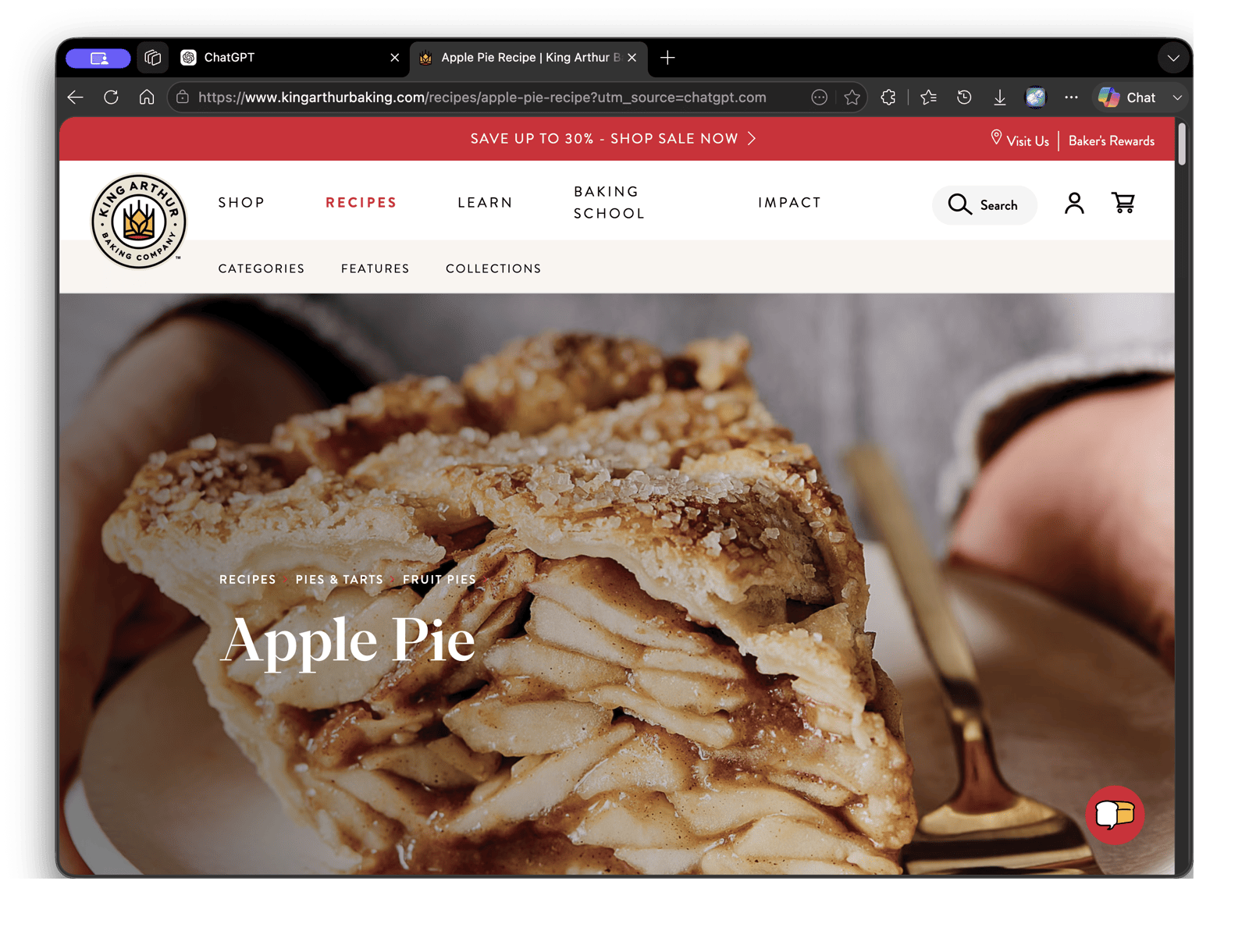 This is the core behavior in Edge: a recipe opened from ChatGPT in a new tab, and the back button that would historically be greyed out is now live.
My first instinct was to just navigate the destination tab to the opener’s URL, so that even if the original tab is gone, the user lands somewhere familiar. Doing that would require prepending an entry to the navigation history stack.
The Chromium engineers pushed back on this pretty hard, because navigation history stacks being append-only is an invariant that a lot of browser internals and web developers rely on. History has a max size of 50 entries, security partitioning and referrer handling assume history only ever grows forward, and prepending breaks those assumptions in ways that create subtle, hard-to-track bugs all the way down.
So we made the simpler call, which is that if the opener tab is gone, the back button is just disabled. iOS Safari actually goes a different route here, navigating to the opener URL and wiping your forward history in the process, and that manipulation is actually visible to web developers: a page could check history.length and figure out that it was probably opened as a new tab. We chose the more conservative path of keeping the feature purely user-facing, without touching the session history that pages can observe through JavaScript.
One more detail worth mentioning: when you long-press the back button, it shows your history. The problem is that this new BackToOpener action is different from a regular history item, because it closes the current tab and moves you somewhere else. If it looks like a normal entry, users might click it expecting a regular navigation and be surprised when their tab disappears. Safari solves this by labeling the entry with the action it performs: in current Safari, the entry reads “Close and Return to [opener title].”
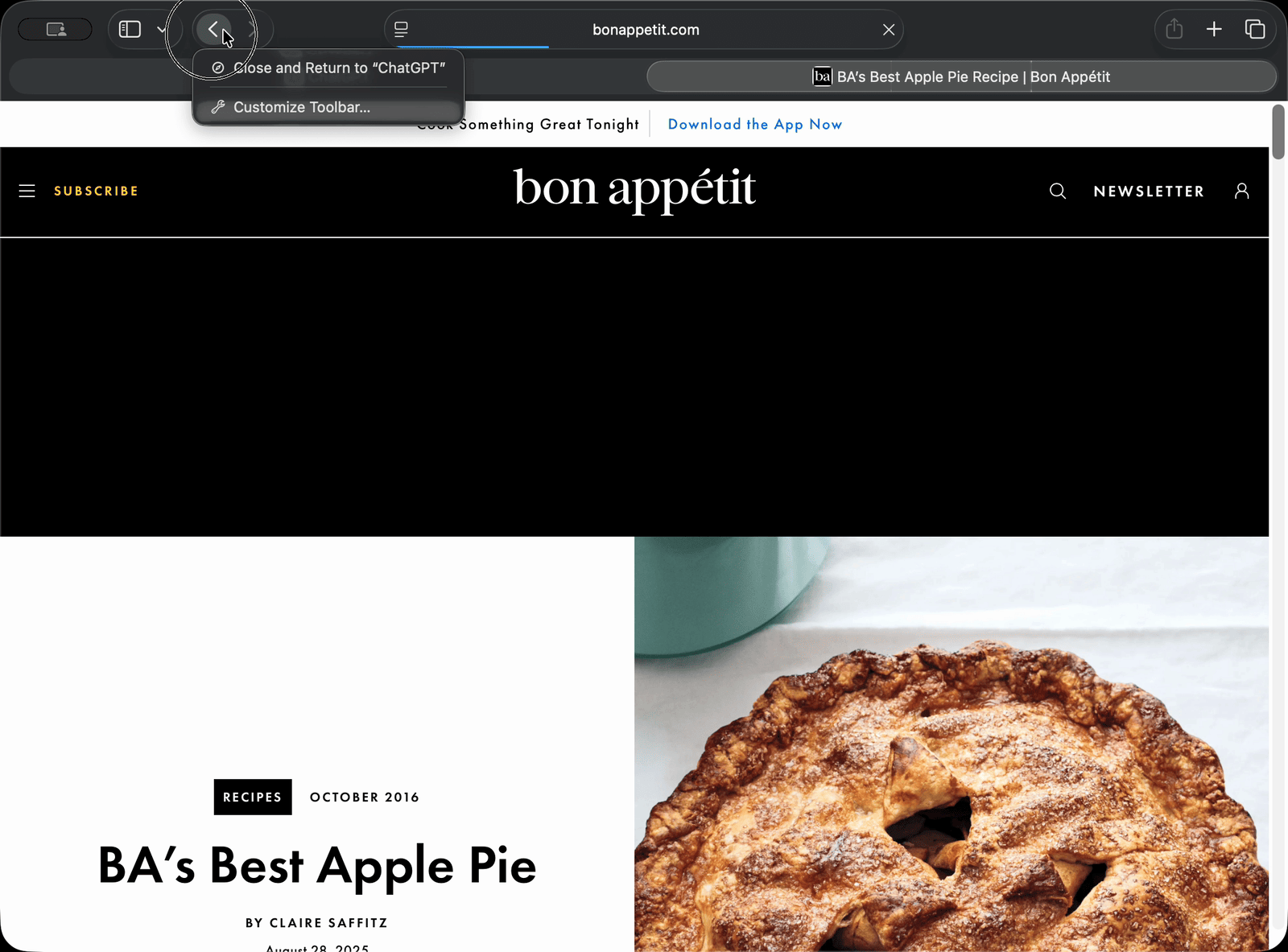 This is Safari today, where the long-press menu spells out the action.
We followed that pattern in Edge, where the entry reads “Close and go back to [opener title].” It’s one small label, but it communicates a lot.
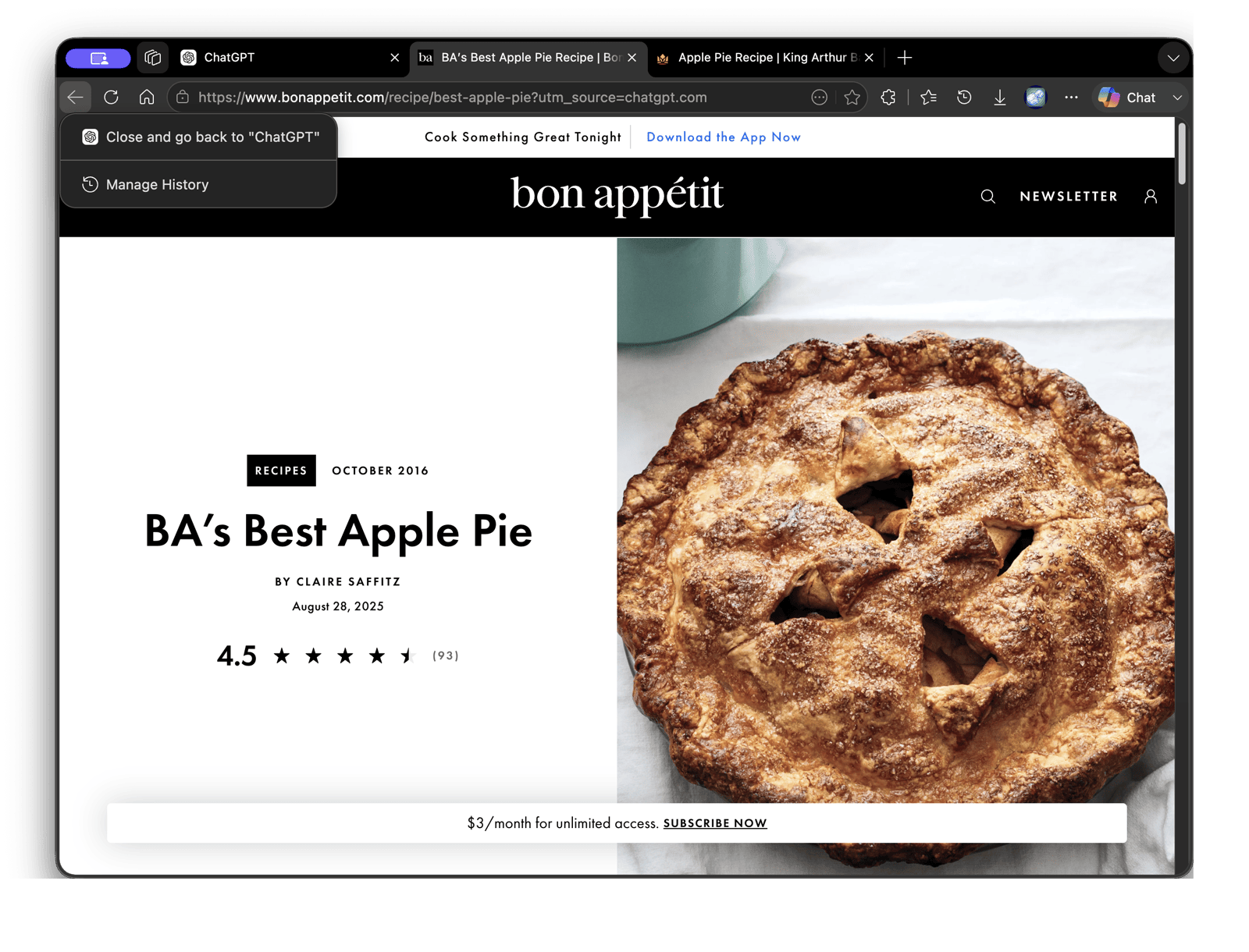 Here’s the same page and the same menu in Edge, with BackToOpener.
Closing the loop with Bing and MSN
Shipping the Chromium feature was only half the project for Edge. The old Bing and MSN redirect hacks were still running, and now that the browser handled this natively, they needed to go.
Working with the Bing and MSN teams to remove the hacks was the less glamorous part of this, aligning timelines, validating coverage, and making sure nothing quietly broke.
MSN was enthusiastic, and when I dug into why, I understood: their existing workaround had shipped years ago with a narrow scope and never fully caught up, leaving whole categories of links and surfaces uncovered.
Bing had a whole list too: beyond the latency cost, the redirect links were long encoded URLs that added weight to every results page, and whenever a user copied a link from Bing results, they’d paste the redirect URL instead of the actual destination, which is a small thing that happens constantly.
All of it goes away with BackToOpener: one native browser behavior, and years of accumulated workarounds become unnecessary. It’s not often that the browser team, the search team, and the content team all want the same change at the same time.
Where it stands
BackToOpener is currently running as an A/B experiment in both Edge and Chrome (the feature is tracked publicly in Chromium’s issue tracker), so we’ll see what the numbers say. The one guardrail I care most about is that new tab launch latency must not regress. The whole point of the feature is smoother navigation, and it would be a bad joke if it slowed down tab creation to get there.
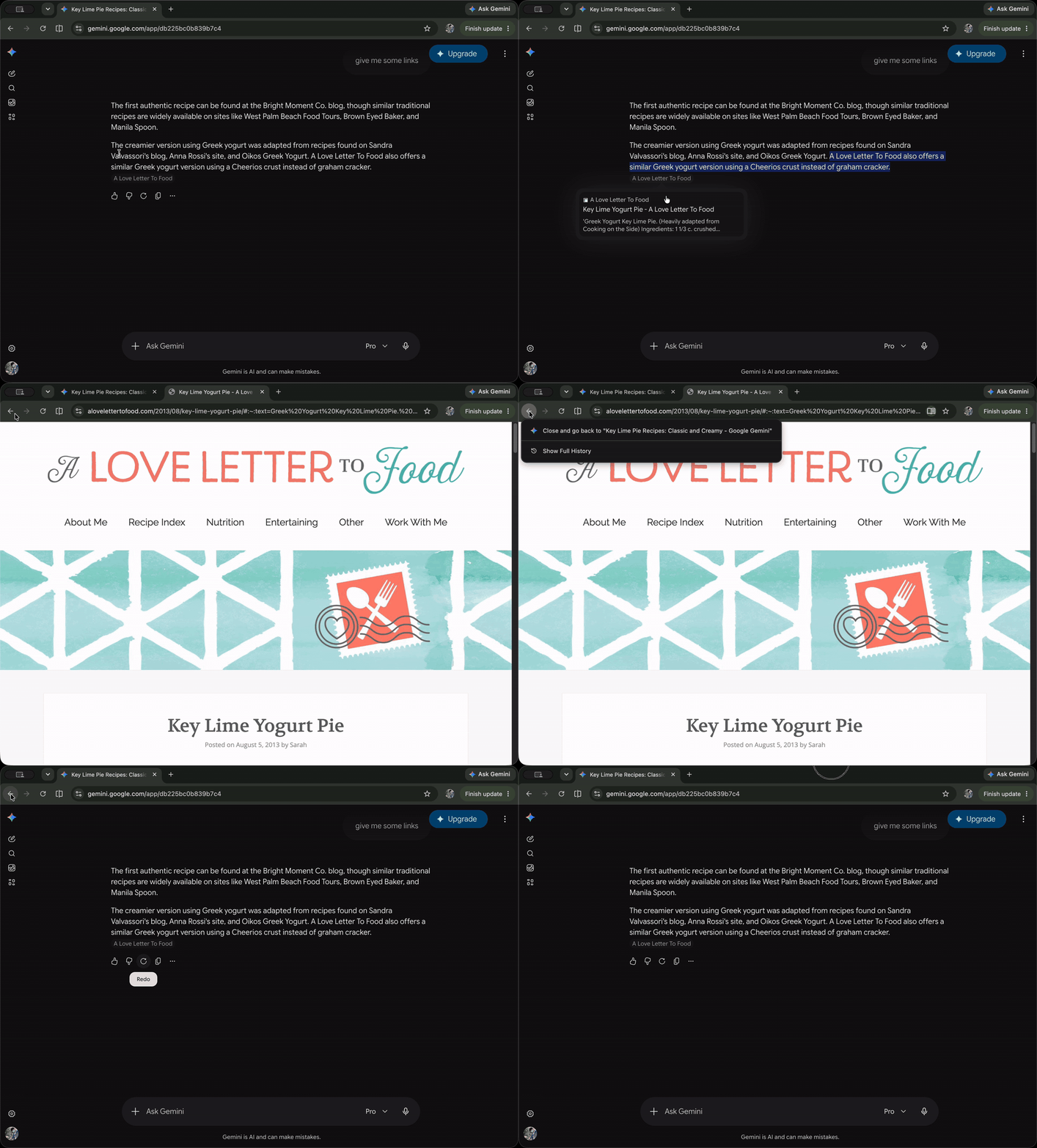 Here’s the whole loop in Chrome: a page opened from a Gemini chat, one press of back, and you’re back in the conversation at the right place. It’s the same feature in a different browser, which is the point of building it into Chromium.
Before I know how it ends
When coworkers started trying BackToOpener internally, the common reaction was along the lines of “wait, how did this not exist?” Which is the funny thing about the feature: it seems obvious in hindsight, but it sat unbuilt in Chromium for years, because obvious and shipped are very different things.
I work on a browser used by hundreds of millions of people, which is a part of a bigger open source project used by billions (thanks Chromium), and most of what I do is too diffuse to point at. If this ships, I’ll be able to point at the back button and say: I did that. That’s a pretty fun thing to get to say at a party.
The experiment is still running, so nothing is final and I don’t want to celebrate too early. But that’s exactly why I wanted to write this all down now, before I know how it ends.